


Notification Fatigue in Budget Trackers: How Automation Causes Budget Blindness
The Core Concepts of Budget Blindness
What Is Budget Blindness?
Budget blindness is a cognitive pattern where a person maintains a written or app-based budget but systematically stops comparing actual spending against it. The plan exists. The gap between plan and reality widens silently.
This differs from financial avoidance, which is a broader psychological retreat from all money-related tasks, often rooted in anxiety or shame. Financial avoidance means not opening the bank app at all. Budget blindness is more insidious: the app is open, the dashboard loads, and the user still doesn't register what the numbers mean. The tracking continues; the awareness doesn't.
Two groups face the highest exposure. First, professionals aged 25-35 with stable income: comfort with their paycheck reduces the perceived urgency of strict monitoring. Second, people managing complex financial structures - multiple accounts, overlapping subscriptions, shared expenses - who experience decision fatigue before they even reach the budget review screen. According to a 2024 Corporate Insight survey, 62% of consumers have created a budget, but only 48% maintain it regularly. That 14-point gap is where budget blindness lives.
The five-stage pipeline from notification to blindness follows a predictable sequence. A transaction triggers an alert and the user registers the spend. Low-value alerts - coffee, transit, a $3 app charge - start generating noise, and perceived relevance drops. Repeated uniform alerts train the brain to classify them as background noise; balances and amounts stop registering consciously. Alert fatigue peaks, and the user disables notifications or stops opening the app. Invisible spending accumulates, and the end-of-month cash shortfall arrives without warning. Each stage has a trigger and a consequence. The architecture of most budget trackers accelerates the progression.
"Financial awareness is not about budgeting every penny - it's about understanding trade-offs. Every automatic payment that bypasses conscious thought is a missed opportunity to make a better decision." - Dr. Marcus Voss, Professor of Behavioral Economics, as quoted in Forbes Money, 2023.
Dr. Voss's framing cuts to the core of the problem. Automation doesn't eliminate financial decisions. It moves them out of conscious view. The result is a user who feels organized because the app runs - but has no real picture of where the money goes.
The Automation Paradox in Personal Finance
How Budget Trackers Use Automated Alerts
Modern budget trackers build their value proposition around reducing manual effort. They connect to bank accounts via APIs like Plaid, pull transactions in real time, auto-categorize spending, and push alerts when something notable happens. The logic is sound: if the app handles monitoring, the user can focus on decisions rather than data collection.
The problem is that this architecture produces a continuous stream of signals. Spending threshold alerts fire when a category hits 80-90% of its limit. Bill reminders send 1-3 days before due dates. Goal nudges arrive after paycheck deposits. Weekly and monthly summaries push on schedule regardless of whether the user has engaged with the app at all.
Each individual notification is defensible. Together, they create a volume problem.
The Notification Overload Problem
When More Becomes Less
The average American smartphone user receives approximately 46 push notifications per day across all apps, according to Business of Apps (2025). Financial apps compete for attention inside that stack alongside social media, news, messaging, and retail. Financial alerts don't arrive in a quiet mental space where they can be processed. They arrive in a torrent.
Industry data from Latinia's Push Channel Trends Report shows that push notifications in banking grew at rates above 40% annually in key markets through 2024. At the same time, open rates for digital banking push notifications dropped from approximately 45% in 2021 to 31% in 2023, according to a Forrester report summarized by Zigpoll. Volume went up. Attention went down. The relationship is not coincidental.
When 68% of Americans report that notification frequency interfered with their productivity in the past year - and 66% say notifications caused stress or fatigue (Edison Mail, 2022) - the assumption that more alerts equal more financial awareness collapses.
Types of Tracker Notifications That Trigger Fatigue
| Notification Type | Frequency | Typical Content | Fatigue Level | Impact on Engagement |
|---|---|---|---|---|
| Spending threshold alerts | Irregular - triggers when category limit is approached (80-90%) | "You've used 90% of your Dining budget." | Medium | High - corrects behavior in real time when not yet habituated |
| Bill due reminders | Scheduled - 1-3 days before payment date | "Your internet bill of $89 is due April 25." | Low | Medium - reinforces app utility, reduces late fees |
| Goal progress nudges | Event-driven or motivational schedule | "You've saved 50% toward your vacation goal!" | Low | High - builds long-term loyalty through positive reinforcement |
| Weekly/monthly summaries | Regular - weekly or monthly push | "Your weekly report: $1,240 spent across 6 categories." | Low-Medium | Medium - prompts reflection, drives in-app sessions |
Spending Threshold Alerts
Threshold alerts fire when spending in a category crosses a preset percentage of the budget. When well-calibrated, they reduce impulsive purchases and cut overspending in targeted categories by 15-20%, according to behavioral research summarized by FinTech Behavior Institute (2025). The fatigue risk rises when thresholds are set too low or when users have too many active categories - each one generating its own alert stream.
Bill Due Reminders
These operate as scheduled tasks, delivering reminders 1-3 days before a payment date. Among the most utilitarian notification type, they reduce missed payments and associated late fees by more than 80% among active users. Fatigue risk here is low - the alerts are predictable, time-bounded, and immediately actionable.
Goal Progress Nudges
Goal nudges use behavioral triggers: a paycheck arrives, and the app prompts the user to move money toward savings. A/B testing by app developers shows these nudges increase total savings balances by up to 10%. They generate minimal fatigue because they carry positive emotional valence and are tied to outcomes the user already cares about.
Weekly/Monthly Summary Push Notifications
Summary notifications deliver aggregated spending data on a fixed schedule. Users who review these summaries are 30% more likely to adjust their budget for the next period. The fatigue risk scales with content quality - a summary that surfaces a genuine insight holds attention; a summary that repeats what the user already knows trains them to swipe it away.
The Psychology Behind the Fatigue-to-Blindness Pipeline
Habituation Effect: Why Your Brain Tunes Out Repeated Alerts
Habituation is the brain's efficiency mechanism. When a stimulus repeats without producing new or meaningful consequences, neural response diminishes. The brain reclassifies the signal as background noise and stops routing it to conscious attention.
A 2024 fMRI study by Meyer and Klein, "Neural Correlates of Notification Habituation: An fMRI Study on Attentional Desensitization," demonstrated this directly. Initial exposure to notifications activated the anterior cingulate cortex (ACC), the region responsible for attention switching. After repeated exposure to low-relevance alerts, ACC activity dropped significantly. The brain had learned - at a neurological level - to treat those signals as irrelevant.
A 2023 study by Patel and Gonzalez, "Breaking the Habituation Loop: The Role of Adaptive and Context-Aware Notification Systems," found that habituation accelerates fastest for predictable, uniform notifications. Systems that vary delivery modality and timing based on user context - activity, location, recent behavior - maintained higher response rates significantly longer.
The practical implication: a budget tracker that sends the same style of alert, at the same trigger point, in the same format, every week, is actively training its users to ignore it. These findings align with the broader alert fatigue literature documented by AHRQ PSNet and IBM's 2025 analysis of alert fatigue systems.
Cognitive Overload and Finite Attention Resources
Daniel Kahneman's dual-process model offers a useful frame here. System 2 - the analytical, deliberate mode of thinking - handles budget review, expense comparison, and financial trade-off evaluation. It requires effort and has a hard capacity limit.
When a user's attention is already saturated by notifications, news, and social media, System 2 resources are depleted before the budget app opens. The user defaults to System 1: fast, intuitive, and prone to pattern-matching errors. The dashboard loads, the brain scans for anything alarming, finds nothing immediately obvious, and closes the app.
The Global FinTech Behavior Study (2025) quantified this effect in investment contexts: presenting more than 10 options increased the probability of decision paralysis by 40%. Information overload also increased susceptibility to herd behavior by 25% and correlated with a 15% rise in impulsive loss-generating trades. The mechanism is identical in budgeting - more data without structure produces worse decisions, not better ones.
Automation Bias: Trusting the App Instead of Engaging
Automation bias is the tendency to accept the output of an automated system without independent verification. In budget trackers, it manifests when users treat the app's auto-categorization as accurate without checking it.
Research from MIT (2024) found that up to 15% of automatic transaction categories in budget apps are incorrect - a restaurant tagged as groceries, a subscription labeled as entertainment. Users rarely correct these errors. The consequence is a distorted budget picture: the user believes they're within limits in a category where they've actually overspent, because the app's chart says so.
The downstream effects compound:
- Distorted budget architecture: Miscategorized expenses create false confidence in spending patterns.
- Reduced financial vigilance: Regular critical review stops because the app "handles it."
- Misaligned decisions: Savings or spending adjustments based on inaccurate category data move the user further from their actual financial position.
The Alarm Fatigue Parallel: What the ICU Teaches Us About Budget Apps
The medical literature on alarm fatigue is the clearest precedent for what happens in budget trackers at scale. In intensive care units, up to 99% of clinical alarms are false positives or non-actionable, according to The Joint Commission. The result: clinical staff become desensitized. Critical alerts get missed. Patient harm follows.
Research cited by Atlassian (2025) found that for clinicians, the likelihood of responding to an alert dropped approximately 30% with each additional reminder. The mechanism is not carelessness - it's a rational cognitive response to a signal environment calibrated incorrectly.
Budget apps face the same structural problem. A user who receives a "you spent $4.50 on coffee" notification, a "you spent $3.00 on transit" notification, and a "you're 72% through your dining budget" notification before noon has already processed three financial alerts before lunch. By the time a genuinely important alert arrives - a suspicious transaction, a missed bill, a budget category that's 30% over - the user's response threshold has been trained upward. The critical signal arrives in a desensitized system.
Signs You Are Already Experiencing Budget Blindness
Behavioral Indicators (Checklist)
The following patterns, individually or combined, indicate active budget blindness:
- You estimate your bank balance rather than checking the exact figure before a purchase.
- You swipe past financial app notifications without reading them - not because you've already seen the information, but because opening the notification feels irrelevant.
- You use a credit card for everyday purchases when your checking account has funds, because the debit balance "feels low" without you having checked it.
- You discover subscription charges on your statement that you forgot existed.
- You avoid opening your budget app in the week before payday because you don't want to see how the month ended.
- You feel surprised by your monthly statement total, even though you've had the tracker running all month.
- You haven't reviewed your budget categories in more than three weeks.
If three or more of these apply consistently, the automation that was supposed to support your financial awareness has replaced it.
Financial Outcomes Linked to Budget Blindness
The behavioral patterns above produce measurable financial damage:
- Overspending: Users who rarely check their balance spend an average of 15% more than their budget allows, according to a 2025 Fintech Global survey.
- Missed payments: Approximately 30% of users who experience financial anxiety and avoid checking their accounts missed at least one payment in the past year (Bank of America, 2024).
- Subscription bleed: Forgotten subscriptions cost the average person approximately $204 per year - roughly $17 per month - according to a 2025 CNET survey compiled by ReSubs (2026).
- Debt accumulation: Consumers without an active budget are three times more likely to carry persistent credit card debt (NerdWallet, 2025).
- Cashless amplification: Research reviewed by MoneyTalksNews (2025) found that mobile contactless payment users spent nearly 10% more than those using physical cards or cash, because digital transactions reduce the psychological "pain of paying."
The math adds up fast. A 15% budget overrun on a $4,000 monthly spend is $600 per month. Add $17 in forgotten subscriptions, plus the interest cost of revolving credit card debt, and budget blindness carries a real annual price tag in the thousands.
How Notification Fatigue Affects Real Budget Tracker Users
Scenario: The Heavy Notification User
Consider a user who connects three bank accounts and two credit cards to a budget tracker, sets category limits across 14 spending categories, and leaves all default notifications enabled. Within the first week, the app sends threshold alerts as spending patterns populate the new limits, bill reminders for upcoming payments, a goal nudge after their first paycheck syncs, and a weekly summary.
By week three, the user has received dozens of alerts. Most of them describe normal spending behavior - coffee, groceries, gas - against limits the user set somewhat arbitrarily during onboarding. The alerts feel repetitive. The user starts swiping them away without reading. By week six, they've disabled push notifications for the app entirely. The tracker still runs. The data still populates. But the user no longer looks at it.
This is not a failure of discipline. It is a predictable outcome of a notification architecture that wasn't designed around the user's actual attention capacity.
Data and Research: Engagement Decay in Finance Apps
Appsflyer and Sensor Tower data from 2023-2025 documents the engagement decay curve in financial apps with precision. Day-one retention averages approximately 25%. By day 30, it falls to 7-10%. By day 90, fewer than 5% of users remain active.
The DAU/MAU ratio - a standard engagement metric - sits at 10-15% for traditional banking apps. Neobanks and trading platforms reach 20-30% by offering higher-frequency utility. For budget trackers specifically, the engagement problem is structural: once the initial setup is complete and the novelty fades, there is no inherent daily pull unless the notification system creates one. And as the data above shows, a poorly calibrated notification system creates the opposite effect.
According to S&P Global Market Intelligence (2024), 83% of adult internet users in the U.S. used a digital finance app in the past year. The average user holds 2.4 financial apps; 37% use three or more. Each additional app fragments attention further and adds to the total notification load, accelerating fatigue across the entire financial app ecosystem.
Tracking expenses and budgeting across three separate apps means three separate alert streams, three separate dashboards, and three opportunities for cognitive overload. The budgeting tracking that was supposed to centralize financial awareness instead distributes it across incompatible systems.
App-Specific Patterns: Mint, YNAB, Rocket Money, Copilot
Each major tracker handles notifications differently, and the differences produce meaningfully different fatigue profiles.
Credit Karma (Mint's successor after Mint closed in January 2024) offers basic notifications - large transactions and bill alerts - with minimal customization. Users who migrated from Mint report a deficit of granular budget alerts rather than excess. The fatigue risk here is low; the engagement risk is higher.
YNAB aligns its notifications with its methodology: alerts fire when a category is overspent and when new income needs to be allocated. The app's philosophy requires active user participation by design, which means notifications feel functional rather than ambient. App Store rating: 4.8. Google Play: 4.6. User feedback rarely cites notification overload - more commonly, users request more granular alerts.
Rocket Money builds its core value around subscription management and bill negotiation. Its notification strength is also its fatigue risk: frequent push messages about optimization opportunities and potential savings can read as marketing rather than financial intelligence. Customization sits at a medium level. App Store: 4.7. Google Play: 4.5.
Copilot uses AI-driven notifications: weekly summaries, transaction classification requests, and anomaly alerts. Customization is highly flexible. Users report minimal fatigue because the alerts feel relevant and timely - each one surfaces something the user didn't already know. App Store: 4.8. Google Play: 4.6.
The pattern is clear: apps that tie notifications to user-defined actions and genuine anomalies retain engagement. Apps that send scheduled, generic, or volume-heavy alerts accelerate the fatigue-to-blindness pipeline.
Breaking the Cycle: How to Reclaim Financial Awareness
Notification Hygiene: Curating Your Alert Stack
Notification hygiene means treating your alert settings as a deliberate configuration, not a default. The goal is a small stack of high-signal notifications that you actually respond to, rather than a large stack of mixed-priority alerts that trains you to ignore everything.
Behavioral economists and UX researchers recommend the following framework:
Keep these on:
- Suspicious or unrecognized transactions (any amount)
- Large transactions above a personally meaningful threshold (e.g., $100+)
- Bill due reminders, 2-3 days before the payment date
- Budget category alerts at 90% of limit - not 50%, not 70%
Convert to digest:
- Daily spending summaries - weekly digest instead
- Small transaction notifications - batch into a single weekly review
- Goal progress updates - weekly or bi-weekly
Turn off entirely:
- Promotional notifications from the app
- Generic "here's a tip" nudges
- Category alerts for categories where you never overspend
This approach mirrors the priority-tier model recommended by Latinia (2025): critical alerts deliver immediately, important alerts batch into a daily summary, low-priority content moves to a weekly digest. The result is a notification environment where every alert carries information worth processing.
Setting Intentional Engagement Schedules
Financial consultants consistently recommend replacing passive monitoring with scheduled active review. A weekly 15-minute "financial check-in" - same day, same time, every week - produces more genuine awareness than 200 passive notifications.
The check-in structure:
- Open the budget tracker and review actual vs. planned spending by category.
- Correct any miscategorized transactions (addressing automation bias directly).
- Note any subscriptions or recurring charges that weren't expected.
- Adjust next week's budget if any category needs recalibration.
This intentional engagement schedule works because it restores System 2 processing to the financial review task. The user is choosing to engage, not reacting to an interrupt. The difference in cognitive quality is substantial.
For couples managing shared finances, this scheduled review also creates a natural moment for alignment - a topic covered in depth in our guide on sharing budget data with partner.
Choosing Trackers with Smart and Adaptive Notification Design
When evaluating a budgeting tracker, notification design is a first-order criterion - not a secondary feature. The right questions to ask:
- Does the app allow per-category threshold customization?
- Can you set different alert thresholds for different account types?
- Does the app offer a digest mode that batches low-priority alerts?
- Can you set a daily or weekly notification cap?
- Does the app use behavioral context - time of day, spending pattern - to determine when to send alerts?
Copilot and Revolut currently lead on customization depth. Monzo sets the standard for contextual, real-time transaction alerts. YNAB's methodology-driven approach naturally limits notification volume. If software alerts vs spreadsheet control is a genuine consideration for your workflow, that tradeoff is explored in detail in our comparison.
Manual Check-Ins as a Counterbalance to Automation
Automation handles data collection well. It handles awareness poorly. The counterbalance is deliberate manual engagement - not to replace the app, but to ensure the user remains the active interpreter of the data.
One practical approach: use the tracker for data aggregation and transaction logging, but conduct the actual budget analysis in a weekly manual review rather than relying on push alerts to surface insights. This separates the data layer - where automation excels - from the decision layer, where human judgment is required.
For users managing discretionary categories specifically, the case for manual oversight is particularly strong. The psychology of managing discretionary spending manually shows that categories with emotional spending triggers benefit most from conscious review rather than automated alerts.
Behavioral Resets: Techniques from Financial Therapy
When budget blindness has persisted for months, notification hygiene alone may not be sufficient. Financial therapists use structured reset protocols to rebuild conscious engagement with money.
The Manual Month, advocated in financial therapy practice, involves disabling all automatic payments and using manual transfers for every expense for 30 days. The physical friction of each transaction restores the "pain of paying" that automation removes. It's temporarily inconvenient by design - that inconvenience is the mechanism.
Money Scripts Analysis, developed by Drs. Brad and Ted Klontz, surfaces the unconscious beliefs driving financial avoidance and budget blindness. Writing down and examining core beliefs about money - "I don't need to track, I make enough" - exposes the cognitive shortcuts that allow blindness to persist.
The Financial Genogram, used by financial therapist Rick Kahler, maps financial behaviors and events across family generations. Patterns of avoidance, overspending, or financial anxiety often have identifiable roots. Naming those roots reduces their automatic influence on current behavior.
The Mindful Spending Journal, promoted by Dr. Megan McCoy, requires writing down the emotional state and motivation behind each discretionary purchase before completing it. The pause between impulse and action is the intervention. Consistent use rebuilds the conscious relationship between spending decisions and financial outcomes.
What Good Notification Design Looks Like in a Budget App
Frequency Capping and Priority Tiers
Effective notification architecture starts with a tiered structure:
Tier 1 - Critical (immediate delivery): Fraud alerts, large unrecognized transactions, overdraft warnings. These bypass any frequency cap. The user needs them now.
Tier 2 - Important (same-day delivery, batched if multiple): Budget category alerts at 90%+ of limit, bill due reminders, significant balance changes.
Tier 3 - Informational (weekly digest): Goal progress updates, spending summaries, optimization suggestions, category trends.
Frequency capping means Tier 3 notifications cannot exceed one per week, regardless of how many events would otherwise trigger them. This prevents the most common failure mode: low-priority information flooding the same channel as critical alerts, until the user stops differentiating between them.
Contextual vs. Scheduled Alerts
A contextual alert fires because something happened: a transaction posted, a limit was crossed, an unusual pattern appeared. It arrives when it's relevant.
A scheduled alert fires because the calendar says so: weekly summary, monthly report, quarterly review. It arrives on a schedule regardless of whether there's anything meaningful to report.
The best notification designs use contextual alerts for actionable information and scheduled alerts only for structured reviews that the user has opted into. Sending a weekly summary that says "you spent similarly to last week" is noise. Sending a contextual alert that says "your grocery spending is running 40% above last month's pace with 12 days left in the period" is signal.
Javelin Strategy & Research (2025) frames this as the core transformation opportunity: converting notifications from background noise into genuine business intelligence tools.
User Control and Customization as a Core Feature
The single highest-leverage design decision a budget app makes is giving users genuine control over their notification environment. According to Latinia (2025):
"Let users set their preferences: offer a control center where they can choose what types of notifications they want to receive and how often."
This isn't a nice-to-have feature - it's a retention mechanism. Users who configure their own alert stack are less likely to disable notifications entirely, because the stack reflects their actual priorities. Users who receive a default configuration they didn't choose are optimizing against it from day one.
Personalized push notifications boost engagement by 88%, and behavioral triggers increase first-transaction rates by 26% in fintech apps, according to Gitnux's push notification statistics review (2026) and CleverTap's Cross-Channel Engagement Report (2024). The data is unambiguous: relevance drives engagement; volume drives opt-out.
FAQ: Notification Fatigue, Budget Trackers, and Budget Blindness
Can Turning Off All Notifications Fix Budget Blindness?
No - but it can stop making it worse. Disabling all notifications removes the habituation stimulus that trains users to ignore financial alerts, but it doesn't restore active financial engagement on its own. The effective approach combines selective notification reduction - keeping only Tier 1 and Tier 2 alerts - with a scheduled weekly manual review. Turning everything off without replacing passive monitoring with active review simply removes the last remaining prompts to engage.
Which Budget Apps Have the Best Notification Controls?
As of 2026, Copilot offers the most flexible notification customization, with AI-driven alert logic and granular user controls. Revolut provides deep threshold and category customization. YNAB limits notification volume by design through its methodology. Rocket Money's strength is subscription and bill alerts, though its optimization push notifications can become fatiguing without manual adjustment. Credit Karma - Mint's successor - offers the least customization of the major players.
Is Budget Blindness a Recognized Psychological Condition?
Budget blindness is not a clinical diagnosis in the DSM-5. It describes a behavioral pattern - systematic failure to compare actual spending against a budget - that sits at the intersection of cognitive habituation, automation bias, and financial avoidance. Financial therapists and behavioral economists use the concept descriptively. Its components - habituation, cognitive overload, automation bias - are each well-documented in peer-reviewed research.
How Long Does It Take to Recover Financial Awareness?
Recovery timelines vary by severity and method. Users who implement notification hygiene and a weekly review schedule typically notice a meaningful improvement in financial clarity within 4-6 weeks - roughly the same timeframe in which habituation initially develops. Users who have experienced extended budget blindness - six months or more - and carry associated debt or missed payments may benefit from a structured financial therapy reset, which typically runs 8-12 weeks of consistent practice. The FinTech Behavior Institute (2025) found that approximately 45% of users who attempt zero-based budgeting abandon it within six months, suggesting that the recovery method matters as much as the intention.
Key Takeaways
- Budget blindness is not financial avoidance - it's the specific failure to compare actual spending against an existing plan, often caused by over-reliance on automated tracking.
- Notification fatigue is the mechanism: push notification open rates in digital banking dropped from 45% to 31% between 2021 and 2023 (Forrester, via Zigpoll), while notification volume grew more than 40% annually.
- The habituation effect operates at a neurological level. Repeated, uniform alerts train the brain's anterior cingulate cortex to classify financial signals as noise (Meyer & Klein, 2024).
- Automation bias means users accept auto-categorized data without verification - and MIT (2024) research shows up to 15% of auto-categories are incorrect.
- The financial cost is measurable: 15% average budget overrun, $204/year in forgotten subscriptions, and a 3x higher likelihood of persistent credit card debt for users without active budget engagement.
- The fix is not more automation - it's better-designed automation. Tiered notifications, frequency capping, contextual alerts, and user-controlled customization restore the signal-to-noise ratio.
- Behavioral resets from financial therapy - the Manual Month, Mindful Spending Journal, Money Scripts Analysis - rebuild conscious financial engagement when passive tools have failed.
The Foundation: Tracking Expenses and Budgeting
Tracking expenses is the operational core of any budgeting system. Without accurate, consistent expense data, every budget category is a guess. The question isn't whether to track - it's how to track in a way that produces genuine awareness rather than a false sense of control.
Budgeting tracking methods fall into three categories. Manual tracking - spreadsheets, pen-and-paper ledgers - maintains the highest level of conscious engagement but demands consistent discipline. Automatic tracking via connected apps reduces friction but introduces the habituation and automation bias risks described above. Hybrid approaches - automatic data collection with scheduled manual review - combine the efficiency of automation with the awareness of deliberate engagement.
According to Academy Bank's research (2023), 53.8% of consumers track expenses manually as their primary method, while only 20.9% rely primarily on a budgeting app. The majority of users who use apps use them as a supplement to, not a replacement for, conscious financial review.
For those learning how to stay consistent with budgeting - whether for themselves or as a financial habit to model - the consistency of the review process matters more than the sophistication of the tool.
What Is Zero-Based Budgeting?
Zero-based budgeting (ZBB) is a budgeting method where every dollar of income gets assigned to a specific expense, savings, or investment category until the equation reaches zero: income minus total allocations equals zero. No dollar is unassigned. No category carries over from last month without deliberate reauthorization.
Peter Pyhrr developed the method at Texas Instruments in the late 1960s as a corporate budgeting discipline. Its application to personal finance follows the same logic: instead of adjusting last month's budget by a few percentage points, you rebuild it from scratch each period based on current priorities.
The four steps for personal zero-based budgeting:
- Calculate total net income for the month.
- List every expense category - fixed obligations, variable spending, savings, debt payments, discretionary categories.
- Justify each category's allocation against current priorities.
- Distribute the full income amount until the balance reaches zero.
This budgeting process has a direct relationship with the notification fatigue problem. Zero-based budgeting requires active monthly engagement - it cannot run on autopilot. That makes it resistant to budget blindness by design, but also demanding in practice.
Drawbacks and Challenges of Zero-Based Budgeting
Think about the process of zero-based budgeting - what might one drawback of this method be? The primary one is time cost. Rebuilding a budget from zero each month requires 1-3 hours of focused attention, depending on financial complexity. For users already experiencing decision fatigue, this demand feels prohibitive.
The method also struggles with irregular income. A freelancer or commission-based worker whose monthly income varies by 30-40% faces genuine difficulty in the "assign every dollar" step when the total dollar amount isn't known until mid-month.
Inflexibility is a documented friction point. When an unexpected expense - a car repair, a medical bill - arrives mid-month, the zero-based budgeting framework requires re-allocating across categories rather than absorbing the cost from a general buffer. For users without a dedicated emergency fund, this creates stress rather than clarity.
The National Financial Educators Council (2024) found that approximately 45% of people who attempt zero-based budgeting abandon it within the first six months, citing complexity and rigidity as the primary reasons. ZBB works best for users with stable income, moderate financial complexity, and the time and inclination for monthly budget construction. For those who want the benefits of intentional allocation without the full rebuild cost, the envelope method offers a lighter-weight alternative.
Envelope Budgeting: How It Works
Envelope budgeting allocates income into discrete spending categories - physically into labeled envelopes, or digitally into virtual "envelopes" within an app. When an envelope empties, spending in that category stops until the next allocation period.
How does envelope budgeting work in practice? At the start of the month, you divide your income: $600 to groceries, $200 to dining out, $150 to gas, $300 to entertainment. Each category gets its own container. Every purchase draws from the relevant envelope. When the dining envelope hits zero, you cook at home.
The psychological engine behind the method is the tangibility of limits. Unlike a spreadsheet category that shows a number, an empty envelope creates a concrete, visible boundary. Research on the cashless effect from The Decision Lab (2021) confirms that reducing the abstraction of spending - making the limit feel real rather than numerical - reduces impulsive purchasing and increases category discipline.
Key Benefits of Envelope Budgeting
What is one benefit of envelope budgeting that separates it from automated tracking? The answer is resistance to budget blindness. When the envelope is the interface, there is no notification to ignore. The information is present at the moment of the transaction decision, not delivered asynchronously as an alert after the fact.
Additional benefits that users consistently report:
- Spending visibility: The remaining balance in each envelope is immediately visible without calculation or app navigation.
- Impulse control: A physical or clearly visualized limit creates friction before an overspend, rather than a notification after it.
- Debt reduction: Users who apply envelope discipline to debt payoff categories consistently report faster progress, because the allocation is protected from competing spending pressures. For users carrying high-interest debt, the debt payoff calculator helps model the payoff timeline alongside an envelope-based budget.
- Adaptability: Unlike zero-based budgeting, envelope budgeting doesn't require rebuilding from zero - it requires only adjusting the allocation amounts, which takes minutes.
Automating Budgeting: Apps and APIs
YNAB and Goodbudget are the primary digital implementations of envelope budgeting as of 2026. Both connect to bank accounts via Plaid's automatic budgeting API, pulling transactions in real time and distributing them across user-defined digital envelopes. The automation handles the data layer - transaction import, categorization, balance calculation - while the envelope structure maintains the user's conscious relationship with category limits.
YNAB's notification design reflects this philosophy: alerts fire when an envelope is overspent and when new income needs allocation. The user is prompted to act, not informed of a fact after the fact.
Newer implementations use AI to analyze spending patterns, auto-suggest category allocations based on historical behavior, and flag anomalies - a subscription charge that's 20% higher than last month, a category running ahead of its historical pace. This is the direction automatic budgeting is moving: not more notifications, but smarter, context-aware signals that surface only when the user's attention is genuinely warranted. The Global Smart Budgeting Apps Market is projected to reach $6.6 billion by 2034, growing from $1.21 billion in 2024 at a CAGR of 18.4% - driven precisely by this shift toward adaptive, AI-powered financial intelligence.
For users evaluating automated subscription audits as part of their envelope system, the key criterion is whether the automation surfaces new information or simply reports known facts. The former reduces budget blindness. The latter contributes to it.
The Bromoney Budget Planner app (iOS / Android) approaches this balance by combining envelope-style category management with curated, priority-tiered alerts - designed to avoid the notification overload patterns documented throughout this article.
Sources Referenced
- Meyer, A., & Klein, D. A. (2024). Neural Correlates of Notification Habituation: An fMRI Study on Attentional Desensitization.
- Patel, S. N., & Gonzalez, G. (2023). Breaking the Habituation Loop: The Role of Adaptive and Context-Aware Notification Systems.
- Latinia. (2025). How to Prevent Push Notification Fatigue in Banking. https://latinia.com/en/resources/how-to-prevent-push-notification-fatigue-in-banking
- S&P Global Market Intelligence. (2024). One-third of Americans use three or more financial apps. https://www.spglobal.com/market-intelligence/en/news-insights/research/one-third-of-americans-use-three-or-more-financial-apps
- Business of Apps. (2025). Push Notifications Statistics. https://www.businessofapps.com/marketplace/push-notifications/research/push-notifications-statistics/
- Edison Mail. (2022). 68% of Americans Say App Notifications Interfered With Their Productivity. https://www.edisonmail.com/blog/study-68-percent-of-americans-say-app-notifications-interfere-with-productivity
- Atlassian. (2025). Understanding and Fighting Alert Fatigue. https://www.atlassian.com/incident-management/on-call/alert-fatigue
- IBM. (2025). What Is Alert Fatigue? https://www.ibm.com/think/topics/alert-fatigue
- CleverTap. (2024). Cross-Channel Engagement Report: Push Notifications in Fintech. https://clevertap.com/blog/push-notifications-in-fintech/
- Gitnux. (2026). Push Notification Statistics 2026. https://gitnux.org/push-notification-statistics/
- MX Research. (2025). New MX Research Shows Consumers Want Better Mobile Banking. https://www.mx.com/news/consumers-cant-live-without-mobile-banking/
- Corporate Insight. (2024). Survey: How and Why Consumers Budget. https://corporateinsight.com/survey-how-and-why-consumers-budget/
- ReSubs. (2026). Forgotten Subscriptions Cost You $204/Year on Average. https://resubs.app/resources/hidden-cost-of-forgotten-subscriptions
- The Decision Lab. (2021). Cashless Effect. https://thedecisionlab.com/biases/cashless-effect
- MoneyTalksNews. (2025). Why Your Tap-to-Pay Habit Could Lead to Overspending. https://www.moneytalksnews.com/why-your-tap-to-pay-habit-could-lead-to-overspending/
- Empeople. (2025). 7 Psychology-Backed Ways to Curb Overspending. https://empeople.com/learn/empeople-insights/7-psychology-backed-ways-to-curb-overspending/
- AHRQ PSNet. Alert Fatigue. https://psnet.ahrq.gov/primer/alert-fatigue
- Javelin Strategy & Research. (2025). Transforming Notifications from Background Noise into Business Tools.
- Market.us. (2025). Smart Budgeting Apps Market Size. https://market.us/report/smart-budgeting-apps-market/
- DECTA. (2025). Digital Wallet and Financial App User Experience 2025. https://www.decta.com/company/media/digital-wallet-and-financial-app-user-experience-2025
- Academy Bank. (2023). The Role of Budgeting Apps in Personal Finance. https://www.academybank.com/assets/files/PGxTMoi1/Role_of_Budgeting_Apps_in_Personal_Finance.pdf
- National Financial Educators Council. (2024). Survey on zero-based budgeting adoption rates.
- Voss, M. (2023). Quote on financial awareness and automation. Forbes Money.

Denis Goncharenko
Head of Content
Editorial Policy: no secondary statistics. Every claim is linked to an official source and dated — datasets and methods are open for review.

Was this article helpful?
Same blogs

Saving Money on Groceries Is Not a Test of Willpower
Federal data shows six grocery categories moving at different rates, not one bill rising evenly. Why the national CPI, the CES spending survey, and USDA's own forecast are each the wrong number to budget against - and how to build your own monthly figure from 8 to 12 weeks of receipts instead.
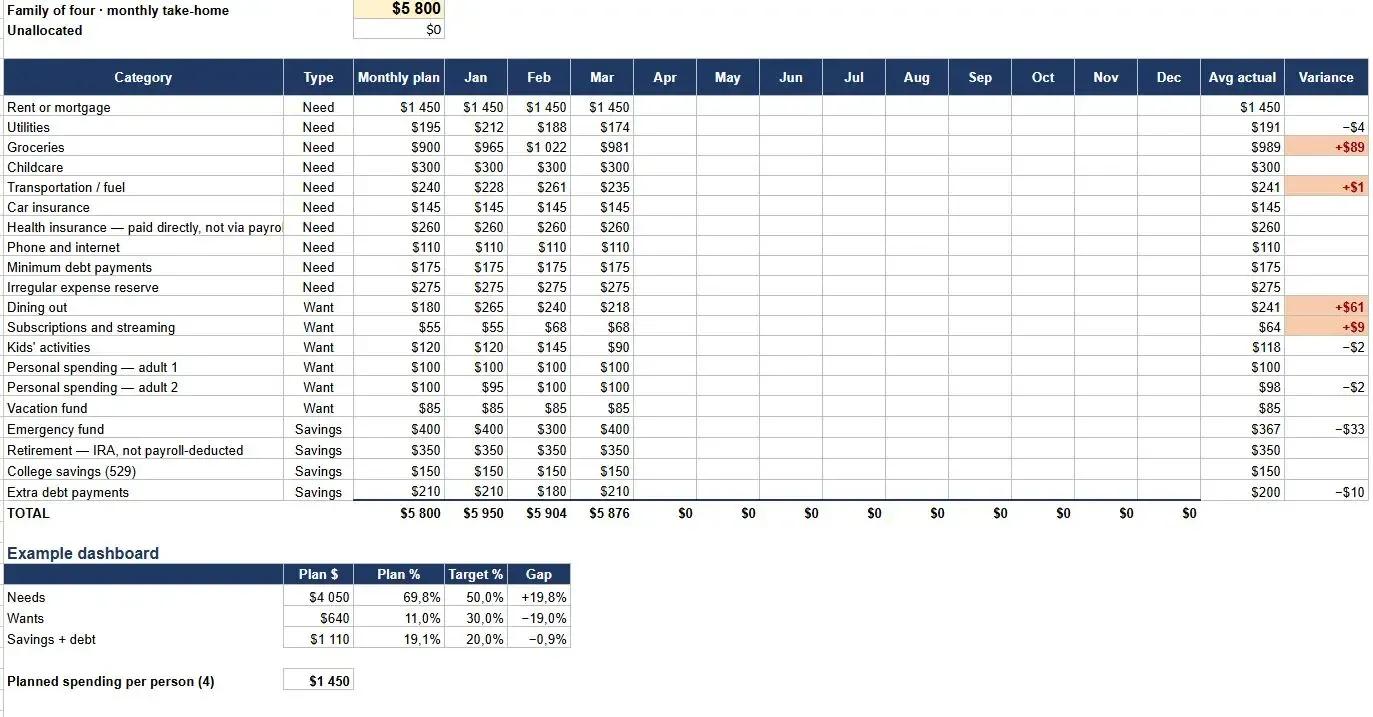
Free Family Budget Template for Excel and Google Sheets
A free household budget spreadsheet for families of three to five, with categories pre-filled and a separate tab that spreads yearly bills like insurance and registration across all twelve months. No email, no sign-up, works in Excel and Google Sheets.

Why Parent PLUS Loans Have Become a Hidden Retirement Crisis for American Parents
Parent PLUS loans can follow parents into retirement, reduce savings, and expose Social Security benefits to offset after default. Here is what near-retirement borrowers should know.