


Free Family Budget Template for Excel and Google Sheets
Free Family Budget Template for Excel and Google Sheets
This is a free household budget spreadsheet built for families of three to five people. It opens in Excel or Google Sheets, the categories are already written in, and it has a separate tab for the yearly bills that break most budgets.
Download the Excel file from Google Sheets | Open the Google Sheet to preview
No email, no sign-up, no account. The file has no macros and makes no network requests - every number you type stays on your device.
What is inside the seven tabs
The workbook has seven tabs. Each one does a single job, and you can ignore the ones you do not need.
Start here is a one-screen instruction sheet: three steps, a color legend, what goes in the month columns, how to add or remove a category, printing, and the disclaimer.
Setup is where you enter the number of adults and children, your monthly take-home income, and your method - either the 50/30/20 split or a custom split with your own shares. You also choose here whether the irregular-expense reserve counts as a need or as savings, and set the current month. A check line warns you if your shares do not add up to a whole.
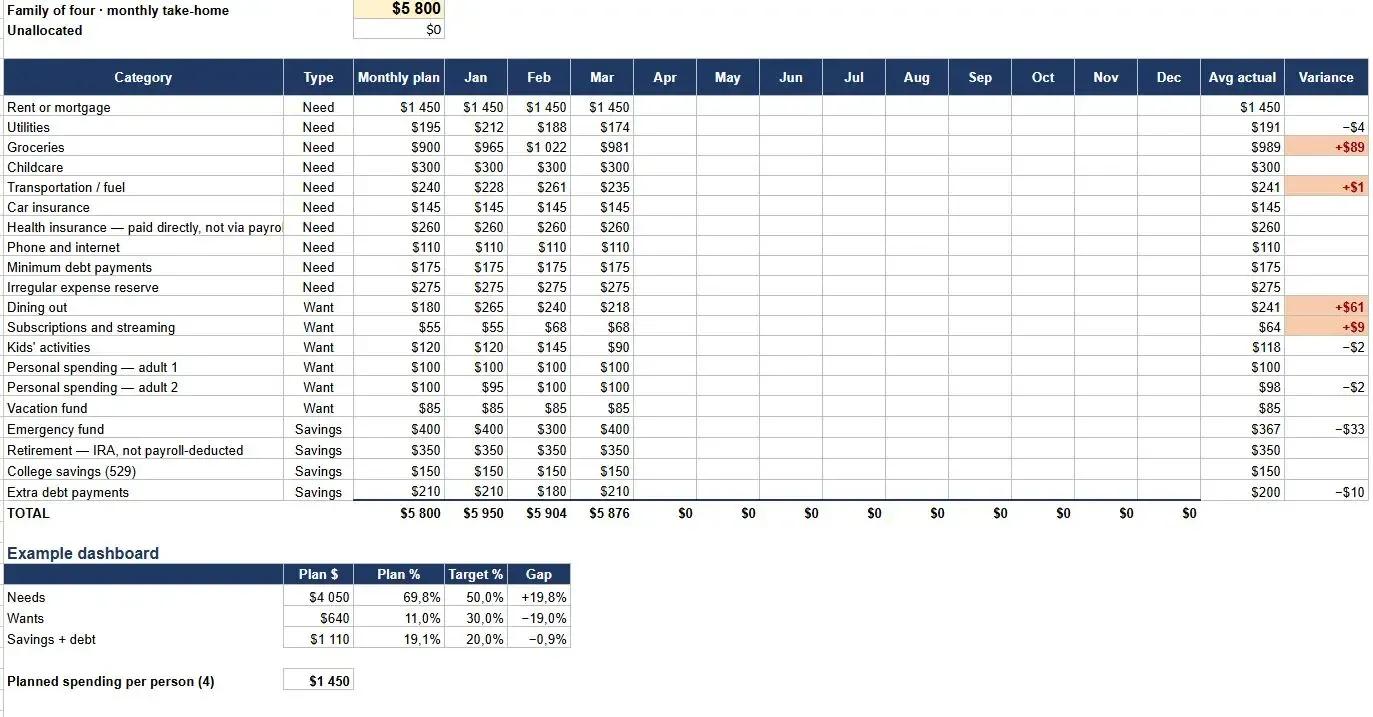
Budget is the main table. Columns are Category, Type (Need / Want / Savings), Monthly plan, then Jan through Dec for actuals, then Avg actual and Variance. Categories are already filled in: rent or mortgage, utilities, groceries, childcare, transportation, car insurance, health insurance if you pay it directly, phone and internet, minimum debt payments, the irregular-expense reserve, eating out, subscriptions, kids' activities, personal spending money for each adult separately, vacation, emergency fund, retirement, college savings, and extra debt payments. Below the last category there are blank rows already wired into the formulas - write a new category there rather than inserting a row.
Irregular handles the bills that arrive once a year. Columns are Item, Annual amount, Month due, Monthly set-aside, and Notes. Common items are pre-loaded: vehicle registration, car insurance paid yearly, home insurance, property tax, school fees, holiday gifts, birthdays, annual subscriptions, medical deductibles, car maintenance, and the vet. The totals at the top feed a single line back into Budget.
Savings tracks goals: Goal, Target amount, Current balance, Monthly contribution, % complete, Months to target, Status. It starts with a three-month emergency fund, a six-month emergency fund, car replacement, home repair, and college.
Dashboard shows plan against target for the three buckets in dollars and in percent with the gap, an Unallocated line (income minus the sum of your plans), planned spending per person, actuals for the month you selected, a trend across months, and your three largest overspends.
Example is a filled-in household of four with take-home of $5,800 a month. The formulas in it are live, not pasted values, so you can pull it apart to see how the sheet works.
How to start in three steps
Open Setup, enter your household size and your monthly take-home, and pick a method. Take-home means what actually lands in your account after taxes, insurance, and retirement withholding. If health insurance and retirement contributions come out of your paycheck, do not enter them again as categories - that double-counts them.
Next, go to Irregular and list the bills you pay once or twice a year. The sheet divides each one by twelve and sends the total back to Budget as a single reserve line.
Last, fill the Monthly plan column on Budget until Unallocated on the Dashboard reaches zero. That is the whole setup. After that you only type actuals into the current month column.
If you are not sure which method to use, the difference between the 50/30/20 split and zero-based budgeting is worth reading first. If you are starting from nothing, how to build a family budget walks through the same order.
The Irregular tab is the part most budgets skip
Most budget sheets have twelve month columns and no way to hold money for a bill that hits in one of them. So the year looks fine until registration, the insurance renewal, and school fees all land in the same six weeks, and the plan gets abandoned.
As the file puts it: "A $1,200 annual insurance bill is not a $1,200 problem in June. It is a $100 problem every month."
That is all the Irregular tab does. You list the yearly amounts, it divides them across the months, and the combined set-aside shows up in Budget as one ordinary line you fund every month. When the bill arrives, the money is already there and nothing else has to move.
Why most budget templates stop getting used
Generic templates are built for one person. They have a single blank category column, no place for childcare or kids' activities, one pot of spending money for a household with two adults in it, and no concept of a bill that is not monthly.
They are also awkward on paper. In this file the print areas on Budget and Dashboard are set, and overspending is marked with a + sign rather than color alone, so it still reads in black and white.
The calculated cells are protected so you do not overwrite a formula by accident, but the protection has no password. If you want to rebuild something, remove it.
If you are weighing a sheet against an app, budgeting software versus spreadsheets covers the trade-off honestly.
Who this template is not for
Households with irregular income. The Setup tab assumes one steady monthly take-home figure. Commission, seasonal, or freelance income needs a different structure - see budgeting for irregular income.
Anyone who wants transactions pulled in automatically. This is a spreadsheet. It does not connect to your bank, and it never will, because it makes no network requests at all. You type your own numbers.
Cash-only households. If most of your money moves as cash and you are not reconciling against a statement, an envelope method will be easier to keep up with than a sheet. The envelope system explains it.
Frequently asked questions
Do I need to give my email to download it? No. Both links above open the file directly. There is no form, no account, and no email step at any point.
Does it work in Google Sheets or only Excel? Both. Use the Excel link for the .xlsx file, or the Google Sheets link to copy it into your own Drive. The formulas behave the same in either one.
Does the file send my numbers anywhere? No. There are no macros and no network requests in the workbook. Everything is calculated locally in whichever program you opened it with.
Can I add my own categories? Yes. Blank rows below the last category on Budget are already connected to the formulas - type into those. Inserting new rows will break the totals.
What counts as take-home income? What lands in your account after taxes, insurance premiums, and retirement withholding come out. If those are deducted from your paycheck, leave them out of the category list so you do not count them twice.
Can I edit it? The template is shared as a read-only master copy so it stays intact for everyone. To start working, download it as an Excel file or save your own copy to Google Sheets — that version is fully yours to edit.

Denis Goncharenko
Head of Content
Editorial Policy: no secondary statistics. Every claim is linked to an official source and dated — datasets and methods are open for review.

Was this article helpful?
Same blogs

Saving Money on Groceries Is Not a Test of Willpower
Federal data shows six grocery categories moving at different rates, not one bill rising evenly. Why the national CPI, the CES spending survey, and USDA's own forecast are each the wrong number to budget against - and how to build your own monthly figure from 8 to 12 weeks of receipts instead.

Why Parent PLUS Loans Have Become a Hidden Retirement Crisis for American Parents
Parent PLUS loans can follow parents into retirement, reduce savings, and expose Social Security benefits to offset after default. Here is what near-retirement borrowers should know.

Parent PLUS Loans: How to Manage Them and Protect Your Retirement
Parent PLUS Loans can collide with retirement savings. Learn how repayment plans, consolidation, PSLF, refinancing, and cash-flow priorities work in 2025-2026.